SS Technology Forum

SS Technology Forum

Computer Migration - Things to Consider

Here are a few points which you can consider while doing computer migration. These points are applicable to all migrations irrespective of the migration tool (ADMT, NetIQ, Quest etc)

Active Directory User Migration

Here is a graphical representation of the high level steps involved in an Active Directory migration using ADMT

User Migration and Merging Using Quest Migration Manager

Pre-creating user account in the target domain is a common scenario these days due to single-sign-on solution, HR management procedure etc

Microsoft Right Management Service (RMS)

Rights Management Service (RMS) is an add-on to many RMS aware applications. In this article my main focus is to explain how we can utilize RMS technology with Exchange 2003 and how we can take advantage of RMS technology to increase the email security

Microsoft ISA Server

I am sure we have all either encountered or heard of this "problem" one time or another if the ISA Server is part of the Active Directory Domain. Is it a problem?

Showing posts with label Exchange 2007. Show all posts

Tuesday, May 31, 2011

Exchange Schema Version

Here is are a couple of options to identify the version of the Exchange Schema version.

Option #1 – Using ADSI Edit

Open Schema Context with ADSI Edit.

Go to the Pproperties of ms-Exch-Schema-Version-Pt and look for the rangeUpper value.

image

Option #2 – DSQUERY Command

Run the following DSQUERY command to get the value of rangeUpper value.

dsquery * CN=ms-Exch-Schema-Version-Pt,cn=schema,cn=configuration,dc=infralab,dc=local -scope base -attr rangeUpper

image

You can compare the rangeUpper value against the following table to identify the Exchange Schema version:

image

AD Schema Version - http://portal.sivarajan.com/2010/03/active-directory-schema-version.html

Monday, September 27, 2010

Latest Version of MFCMAPI is Available for Download

The latest Version of MFCMAPI is Available for Download.  You can download it from the following location:

http://mfcmapi.codeplex.com/

More info: http://portal.sivarajan.com/2010/05/mailbox-and-outlook-troubleshooting.html

Tuesday, August 3, 2010

How to protect Exchange with Data Protection Manager (DPM) 2010

The DPM team has released a new whitepaper on “How to protect Exchange with Data Protection Manager (DPM) 2010”

You can download this whitepaper from the following location:

http://www.microsoft.com/downloads/details.aspx?displaylang=en&FamilyID=be885d26-25e5-41ff-afc8-506414aed960

Monday, July 26, 2010

digicert - SSL Certificate Management & Troubleshooting Tool

Digicert is a certificate management tool which can be used to manage, troubleshoot, and fix the SSL certificates.   This utility provides the following features:

  • See all the SSL certificates installed on your server.
  • Easily view details for each certificate.
  • Fix intermediate certificate problems with one click.
  • Import and Export your certificates to make a backup or move them between servers.
  • Test a certificate to verify its private key is functional.
  • Install a certificate to a pending request.
  • Repair a certificate whose private key exists on the server but is not correctly associated with the certificate.

You can download this utility from Digicert’s site for free: https://www.digicert.com/util/

Thursday, July 1, 2010

iOS 4 update for Exchange

Immediately after updating to iOS 4, some users may notice that Exchange ActiveSync Mail, Contacts, or Calendars do not sync, or sync very slowly. In addition, some Exchange Server administrators may notice their servers running slowly.

To work around this issue, users should install a configuration profile from Apple that increases the amount of time the iOS 4 device will wait for the Exchange Server to respond to its sync requests. For best results, the profile should be installed on as many iOS 4 devices at your company as possible.

Read more and download the configuration profile at - http://support.apple.com/kb/TS3398

Wednesday, June 30, 2010

Hotfix Rollup 1 for Microsoft Forefront Protection 2010 for Exchange

Microsoft has released the first Hotfix Rollup 1 for Forefront Protection for Exchange. The following article contains the information about how to obtain the hotfix rollup and about the issues that are fixed by the hotfix rollup:

http://support.microsoft.com/kb/2181692

Download:
http://support.microsoft.com/hotfix/KBHotfix.aspx?kbnum=2181692&kbln=en-us

Monday, June 21, 2010

Exchange 2007 SP3 with support for Windows Server 2008 R2 Now Available

Exchange Server 2007 SP3 is available for download. This service pack enables Exchange 2007 to be installed on Windows Server 2008 R2 version of the operating system.  Also, with this SP3, Exchange 2007 management tools can be installed on Windows 7 machines.

Download Exchange 2007 SP3

http://www.microsoft.com/downloads/details.aspx?FamilyID=1687160b-634a-43cb-a65a-f355cff0afa6&displaylang=en

Schema Changes

Exchange 2007 SP3 requires Schema changes even if you have the RTM version of Exchange 2010.  You can see these details on the following link:

http://technet.microsoft.com/en-us/library/ff607224(EXCHG.80).aspx

Thursday, June 17, 2010

Exchange Load Generator 2010 - LoadGen

Microsoft has released the Exchange Load Generator 2010 (LoadGen).

LoadGen allows you to test how a server running Exchange 2010/2007 responds to e-mail loads. To simulate the delivery of these messaging requests, you run LoadGen tests on client computers. These tests send multiple messaging requests to the Exchange server, thereby causing a mail load. LoadGen is a useful tool for administrators who are sizing servers and validating a deployment plan. Specifically, LoadGen helps you determine if each of your servers can handle the load to which they are intended to carry. Another use for LoadGen is to help validate the overall solution.

Download 32 bit:

http://www.microsoft.com/downloads/details.aspx?familyid=1AAA3F65-BAB0-42E6-861B-A25ADF258EF3&displaylang=en

Download 64 bit:

http://www.microsoft.com/downloads/details.aspx?familyid=CF464BE7-7E52-48CD-B852-CCFC915B29EF&displaylang=en

Tuesday, June 15, 2010

Updated Exchange 2010 and Exchange 2007 Calculator

Microsoft has updated the Mailbox Server Role Requirements Calculator for Exchange 2007 and 2010 again.  You can download them from the following location:

Exchange 2010: http://msexchangeteam.com/files/12/attachments/entry453145.aspx

Exchange 2007: http://msexchangeteam.com/files/12/attachments/entry438481.aspx

Sunday, June 6, 2010

Exchange Server Active Directory Schema Changes Reference

This download includes the Active Directory Schema Reference, which provides information about the changes that Microsoft Exchange Server makes to the Active Directory schema when it is installed.

This provides a summary of the Active Directory schema changes that are made when you install Microsoft Exchange Server 2010 Service Pack 1 (SP1), Exchange Server 2010, Exchange Server 2007 Service Pack 3 (SP3), Exchange Server 2007 Service Pack 2 (SP2), Exchange Server 2007 Service Pack 1 (SP1), Exchange Server 2007, and Exchange Server 2003. 

Download

Thursday, May 6, 2010

Identify Users Connecting to Exchange Server Using POP3

You can use the following 2 options to identify the POP3 users in an Exchange environment. 

1.    Enable diagnostic logging for the POP3svc service for authentications and connections. You will see the connection details in the event log. 

2.    Another option is to view pop connections under your pop SMTP virtual server which is located in Protocols ->  POP3 -> Default POP3 Virtual Server -> Current Sessions.

Also, a log file will be generated in the Exchange logging folder under POP3.

Monday, April 12, 2010

PFDAVAdmin - Update Is Now Available

An updated version of the PFDAVAdmin tool has been released . You can download it from the following location:

http://www.microsoft.com/downloads/details.aspx?familyid=635BE792-D8AD-49E3-ADA4-E2422C0AB424.

You can use  Exchange Server Public Folder Distributed Authoring and Versioning (DAV)-based Administration tool (PFDAVAdmin) to perform various management tasks related to public folders and mailboxes.  The tool checks the permissions status of each public and mailbox folder and corrects any problems found. The ability to bulk export/import the permissions and replica lists make this tool invaluable in achieving greater productivity in managing public folders. The program can also reports content information of each public folder and mailbox folder such as the number of items in each folder, size of folder and most recent modification date of any item in the folder. 

PFDAVAdmin is supported when running with Exchange 2000 Server, Exchange Server 2003 and Exchange Server 2007 but it  cannot be used with Exchange 2010 servers.

Wednesday, March 3, 2010

Public Folder Reporting Tool - PfRep

Here is a useful Public Folder reporting tool (PfRep).  It can analyze Exchange 2000/2003/2007 public folder usage.  As you can see in the following screenshot, Public Folders are color coded based on its usage.

image

This really a useful tool especially if you are performing a Public Folder migration.   You can download this free tool from the following location:
http://pfrep.codeplex.com/releases/view/17650

Wednesday, June 6, 2007

Exchange 2007: Standard to Enterprise Upgrade Path

Here are some good guidelines when thinking about an Exchange 2007 upgrade:

  • You can use a valid product key to go from the evaluation version (Trial Edition) to either the Standard Edition or the Enterprise Edition
  • You can use a valid product key to go from the Standard Edition to the Enterprise Edition
  • You can also re-license the server using the same edition product key
  • You can change the product key without having to reinstall or reconfigure Exchange
  • You cannot use product keys to downgrade from the Enterprise Edition to the Standard Edition, nor can you use them to revert to the Trial Edition

Thursday, May 17, 2007

Exchange Server 2007 Documentation

Microsoft has released some downloadable Exchange Server 2007 documents.

http://technet.microsoft.com/en-us/exchange/bb330844.aspx

Monday, March 26, 2007

Minimum Physical Memory Recommendation for Exchange 2007

Here are the physical memory recommendations for Exchange 2007 based on number of Storage Groups.

Number of storage groups

Minimum required physical RAM

1-4

2 GB

5-8

4 GB

9-12

6 GB

13-16

8 GB

17-20

10 GB

21-24

12 GB

25-28

14 GB

29-32

16 GB

33-36

18 GB

37-40

20 GB

41-44

22 GB

45-48

24 GB

49-50

26 GB

Monday, February 5, 2007

Things to Consider when Installing Exchange 2007 – Part II

Things to Consider when Installing Exchange 2007 - Part II By Santhosh Sivarajan

Things to Consider when Installing Exchange 2007 - Part I

Things to Consider when Installing Exchange 2007 - Part II

Exchange Support

When considering an Exchange upgrade, the first question that normally comes to mind is an in-place upgrade versus a parallel migration. Since Microsoft only supports the 64 bit Exchange 2007 version in production, you may ask "what I am going to do with our existing Exchange 2000 or Exchange 2003 servers?" The answer is there is no direct upgrade (in-place) from Exchange 2000 or Exchange 2003 to Exchange 2007. You must install Exchange 2007 on a new server and join it with your existing Exchange organization. Also, when thinking about an Exchange 2007 installation, keep the following items in mind:

  • You cannot transition an Exchange 5.5 organization into Exchange 2007. You have to upgrade Exchange 5.5 to either Exchange 2000 or Exchange 2003 before even thinking about Exchange 2007.
  • Exchange organization must be in native mode
  • Placing Exchange 2007 and Exchange 2000 or 2003 servers in the same routing group is not supported.
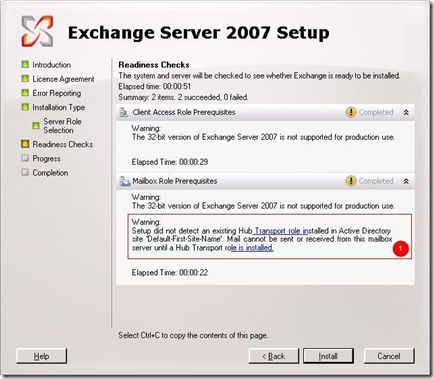
  • A Hub-Transport role is required to send or receive an email from an Exchange 2007 mailbox.
image

  • You can assign multiple roles to the same server.
  • It is recommended to install Edge Transport role on a nonmember server and place it in the DMZ.
  • Cluster can be configured only with mailbox servers.
  • Exchange Server 2007 Enterprise Edition supports up to 50 storage groups and 50 databases per server. You can configure up to five databases per storage group, up to a maximum of 50 databases.
  • Unlike Exchange 2000 and 2003, both Exchange 2007 Enterprise and Standard Edition have no database size limits.
  • The following components are not supported in Exchange 2007
    • Microsoft Mobile Information Server
    • Instant Messaging service
    • Exchange Chat Service
    • Exchange 2000 Conferencing Server
    • Key Management Service
    • cc:Mail connector
    • MS Mail connector
    • GroupWise connector
    • X.400 connector
    • Connector for Lotus Notes

The following table summaries the supported Exchange upgrade/transition options:

Current Messaging System

Upgrade

Transition

Exchange 5.5

Not Supported

No direction transition. The Exchange organization has to be upgraded to either Exchange 2000 or 2003 first.

Exchange 2000

Not Supported

Supported

Exchange 2000 and Exchange 2003 Mixed Org

Not Supported

Supported

Exchange 2003

Not Supported

Supported

Outlook Client Support

The following versions of Outlook client are supported to access an Exchange 2007 mailbox:

  • Office Outlook 2007
  • Microsoft Outlook 2003
  • Microsoft Outlook 2002

Outlook Web Access Support

One common question will be about Outlook Web Access. The user experience in Outlook Web Access depends on the location of the user's mailbox. For example, if a mailbox is located on a Microsoft Exchange Server 2003 back-end server and the Client Access server is running Exchange 2007, the user receives Outlook Web Access in Exchange Server 2003. If you remember the upgrade path of Exchange 2000 to 2003, you have to upgrade the Front-End server first in-order to install an Exchange 2003 server in an organization. Unlike Exchange 2003, you can install an Exchange 2007 server in an Exchange 2000 organization without making any modifications to the existing Exchange 2000 Front-End server.

Mobile Devices Support

Similar to previous versions of Exchange, Exchange 2007 also supports mobile access. To access the mailbox using your mobile device, confirm that your device is one of the following supported models:

  • Mobile phones running Windows Mobile® 2003 Second Edition
  • Mobile phones running Windows Mobile 5.0
  • Mobile phones running Windows Mobile 5.0 with the Messaging and Security Feature Pack (MSFP)
  • Mobile phones running a non-Windows operating system that are compatible with Exchange ActiveSync

Exchange Management and Administration

The Exchange management console replaces the Exchange systems manager in Exchange 2007. The Exchange management tools include Exchange Management Console, Exchange Management Shell, Exchange Help file, Microsoft Exchange Best Practices Analyzer Tool, and Exchange Troubleshooting Assistant Tool. It can be installed on a computer running Windows Server 2003 SP1 Standard or Enterprise Edition, Windows Server 2003 R2 Standard or Enterprise Edition or Windows XP SP2. Also, when you are thinking about Exchange 2007 administration keep the following in mind:

  • You cannot manage Exchange 2000 or 2003 using Exchange 2007 Management console. You won't see Exchange 2000 or 2003 servers when you using Exchange 2007 management console.

image

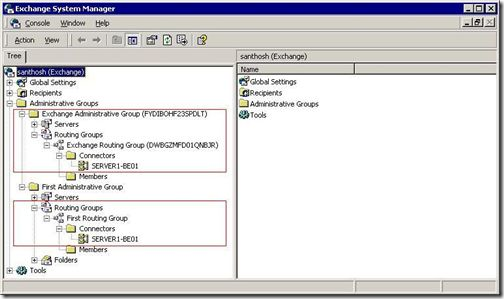
  • Exchange 2007 mailboxes must be managed with Exchange 2007 management console or shell. It is not recommended to manage Exchange 2007 mailboxes using Exchange 2003 systems manager. When you open Exchange System Manager, you will see Exchange 2007 severs in an Exchange Administrative Group. As I mentioned earlier in this document, you cannot join an Exchange 2007 server to an existing Admin Group. Even if you can see the Exchange 2007 server from Exchange systems manager, it is not recommended to manage Exchange 2007 servers from there.
image

  • Exchange 2003 mailboxes can be modified, edited or removed with Exchange 2007 admin tools, but they cannot be created.

I hope this article provides a better understanding of Exchange 2007 and its pre-requisites. If you have any questions regarding this article, feel free to email me at santhosh@sivarajan.com.

Things to Consider when Installing Exchange 2007 - Part I

Things to Consider when Installing Exchange 2007 - Part II

Friday, January 12, 2007

Things to Consider when Installing Exchange 2007

Things to Consider when Installing Exchange 2007 – Part I By Santhosh Sivarajan

Things to Consider when Installing Exchange 2007 – Part I
Things to Consider when Installing Exchange 2007 – Part II

As we all know there is a lot of information out there about how to install and configure an Exchange 2007 server. But when considering an upgrade, I am sure we all have questions about how to upgrade an existing system to a new one and what are the supported or non-supported features in the new environment. I think it is very important to get a thorough understanding of the new system and application before even thinking about an upgrade. In this article my goal is to go through the Exchange 2007 “transition” path and supported configuration in terms of Active Directory and Exchange. As always, a picture is worth more than a thousand words, so I included a few screen shots explaining common errors when installing Exchange 2007. Hopefully, after reading this article no one will make any mistakes when they are installing Exchange 2007. :-)


Active Directory Support
As Exchange 2000 and Exchange 2003, Exchange 2007 requires Active Directory so we have to start our planning and designing from the Active Directory level. The following items must be considered when thinking about an Exchange 2007 installation:

  • Schema master must run on a Windows Server 2003 Service Pack 1 (version 5.2-3709) or Windows 2003 R2 Domain Controller.
image
  • All the Global catalog servers in the local Active Directory site where you will install Exchange 2007 must be running Windows Server 2003 or later

image

 
Note: If you have more than one GC in the local Active Directory site, make sure all are running Windows 2003 or later.

  • The Active Directory domain functional level must be Windows 2000 native or higher for each domain in the Active Directory forest where you will install Exchange 2007
image
  • Proper Active Directory site configuration is very important for the Exchange 2007 installation. Exchange Server 2003 and Exchange 2000 Server use routing groups to define an Exchange-specific routing topology. Exchange 2007 uses Active Directory sites to define its routing topology.
  image
  • The Active Directory Schema upgrade must be performed to support Exchange 2007. The schema can be upgraded along with the Exchange 2007 installation process.
  • Make sure enough Global Catalog servers are available to support the Exchange servers. The recommendation for a Global Catalog server is the same as the previous versions of Exchange servers. It is recommended to have a 4:1 ratio of Exchange processors to Global Catalog server processors, assuming that the processors are of similar models and speeds.

Operating System Support
For the production installation, Exchange 2007 can be installed on any of the following OS:
  • Windows Server 2003, Standard x64 Edition
  • Windows Server 2003, Standard x64 Edition, with MUI
  • Windows Server 2003, Enterprise x64 Edition
  • Windows Server 2003, Enterprise x64 Edition, with MUI
  • Windows Server 2003, R2 Standard x64 Edition
  • Windows Server 2003, R2 Standard x64 Edition, with MUI
  • Windows Server 2003, R2 Enterprise x64 Edition
  • Windows Server 2003, R2 Enterprise x64 Edition, with MUI
  • Windows Server 2003 SP2, Standard x64 Edition (available early 2007)
  • Windows Server 2003 SP2, Standard x64 Edition, with MUI (available early 2007)
  • Windows Server 2003 SP2, Enterprise x64 Edition (available early 2007)
  • Windows Server 2003 SP2, Enterprise x64 Edition, with MUI (available early 2007)

Unlike Exchange 2003, the NNTP and SMTP service must be removed from the server where you install Exchange 2007. If you are familiar with Exchange 2003 installation, you cannot install Exchange 2003 without NNTP and SMTP services. This is different in Exchange 2007. You can see on the following screen the difference in error messages:

image

The 64 bit version of Exchange 2007 is the only version supported for production installation and use. But for testing purposes, you can install Exchange 2007 on a 32 bit platform. You will see a warning message as displayed on the following screen shot if you try to install Exchange 2007 32 bit version:

image


The following table summarizes the supported Exchange 2007 configuration for production:

Hardware
Supported OS
Supported AD
32 Bit
64 bit
Windows 2000
Windows 2003
Windows 2000
Windows 2003
Exchange 2007
Not Supported
Supported
Not Supported
Supported on Windows Server 2003 with Service Pack 1 (SP1), Standard Edition, Enterprise Edition or Windows Server 2003 R2
Not Supported
Supported. Domain functional mode must be Windows 2000 native or higher.


I hope this part of the article provides a better understanding of Exchange 2007 and its pre-requisites. If you have any questions regarding this article, feel free to email me at santhosh@sivarajan.com.

Things to Consider when Installing Exchange 2007 – Part I
Things to Consider when Installing Exchange 2007 – Part II

Monday, November 6, 2006

Exchange 2007 Management Shell Quick Reference

Overview

Microsoft® Exchange Server 2007 introduces a new management platform called the Exchange Management Shell, based on Microsoft Windows® PowerShell, formerly codenamed "Monad". This topic provides a list of many frequently used cmdlets, important conventions, and useful tips. The information is presented by feature area, such as recipient, transport, and database administration.

http://www.microsoft.com/downloads/details.aspx?familyid=01A441B9-4099-4C0F-B8E0-0831D4A2CA86&mg_id=10048&displaylang=en

Wednesday, November 1, 2006

Exchange Server 2007 Setup Command Reference

I copied all the available setup.exe command parameters and syntax onto my web site. I am sure it will be useful for others as well

http://www.sivarajan.com/

Popular Posts

Share

Twitter Delicious Facebook Digg Stumbleupon Favorites More