Before I really dive into Exchange 2010, I thought I would install and play with it first. I took some screen shots and notes during the installation. I would like to share these findings in this article.
I am in a process of creating a "Things to Consider….." document for Exchange 2010. It will be added to my blog soon. Thanks again for all your feedbacks regarding my "Things to Consider when Installing Exchange 2007" article (http://santhoshsivarajan.blogspot.com/2007/02/things-to-consider-when-installing.html). It is really a good inspiration for me to come up with more articles like this.
In this article, my focus is more on Microsoft Exchange 2010 installation and configuration process in a pristine environment. But in my next article I would explain the details about transitioning or migrating from Exchange 200X to Exchange 2010.
Versions of Exchange 2010
Exchange 2010 is available in 32-bit and 64-bit versions. The 64 bit version is for production environments and the 32-bit version is for development environments. I haven't seen the 32 bit version of Exchange 2010. I am using 64 bit version for my testing.
Pre-requisite
The following section explains the pre-requisites before you can install Microsoft Exchange 2010.
Hardware & Software:
Exchange 2010 can only be installed on
- A x64 architecture-based computer with Intel or AMD processor.
- Microsoft Windows Server 2008 Standard x64 Edition or Enterprise x64 Edition
Active Directory
- The functional level of the Active Directory forest must be at least Windows Server 2003 native.
- The Active Directory domain functional level must be Windows 2000 native or above.
- The Active Directory root domain must be windows 2000 native mode or above
- AD management tools must be installed (at least LDIFDE.EXE )on the Windows 2008 server before preparing the schema.
- Make sure at least one Global Catalog server is available in every site when you plan to install Microsoft Exchange 2010. The recommendation for a Global Catalog server is the same as the previous versions of Exchange servers. It is recommended to have a 4:1 ratio of Exchange processors to Global Catalog server processors, assuming that the processors are of similar models and speeds.

Note: I have seen some Exchange 2007 reference in the screenshot. Again, this product is still in beta :-)
Hotfixes and Software
The following hotfixes and software needs to be installed on the server where you are planning to install Microsoft Exchange 2010:
Hot fixes
- Microsoft Knowledge Base 951725
- Microsoft Knowledge Base 950888 - Requires a reboot

Software:
- NET Framework 3.5
- Windows Remote Management 2.0 - Requires a reboot
- Windows PoweShell V2
- 2007 Office System Converter

IIS 7.0
The Microsoft IIS 7.0 must be installed on the server with the following IIS components and features before you can install Microsoft Exchange 2010:
- IIS 6 Metabase Compatibility component
- Web Server (IIS) Tools component
- Windows Process Activation Service Process Model component
- IIS 7 Basic Authentication component
- IIS 7 Windows Authentication component
- IIS 7 .NET Extensibility component
- IIS 6 Management Console
- HTTP Activation feature
- IIS 6 Metabase Compatibility component
- IIS 7 Dynamic Content Compression component
- IIS 7 Static Content Compression component
- IIS 7 Digest Authentication


Active Directory Schema Preparation
Active Directory Schema needs to be prepared before installing Microsoft Exchange 2010. You can manually update the schema by using Setup /prepareAD command or the installation process will update it during the installation. You must install AD management tools on the Windows 2008 server before preparing the schema.
The following 2 screen shots explain the available option and syntax with Setup.com command. This file is located on the root of the Microsoft Exchange 2010 CD.


If you haven't installed the AD management tool on the Windows 2008 server, you will get the following error message during the installation:

You can install the remote management tool by running the following command:
ServerManagerCmd -i RSAT-ADDS
Or if you just want to continue with the Exchange 2010 installation, you can simply copy the LDIFDE.EXE file to the System32 folder. That's what I did in my lab.
If you have followed my document, you are now ready to install your first Exchange 2010 in your environment.
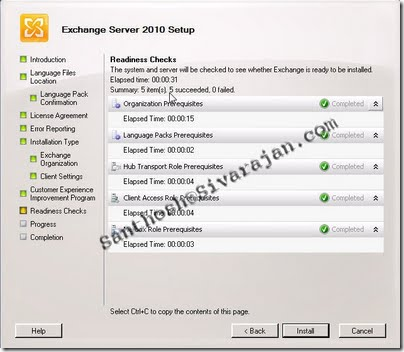
In my next article, I will be discussing about transitioning from different Exchange version to Exchange 2010 and Exchange installation process.
As always, I would I like to hear your feedback and suggestions. Please feel free to send me an email at Santhosh@Sivarajan.com


