SS Technology Forum

SS Technology Forum

Computer Migration - Things to Consider

Here are a few points which you can consider while doing computer migration. These points are applicable to all migrations irrespective of the migration tool (ADMT, NetIQ, Quest etc)

Active Directory User Migration

Here is a graphical representation of the high level steps involved in an Active Directory migration using ADMT

User Migration and Merging Using Quest Migration Manager

Pre-creating user account in the target domain is a common scenario these days due to single-sign-on solution, HR management procedure etc

Microsoft Right Management Service (RMS)

Rights Management Service (RMS) is an add-on to many RMS aware applications. In this article my main focus is to explain how we can utilize RMS technology with Exchange 2003 and how we can take advantage of RMS technology to increase the email security

Microsoft ISA Server

I am sure we have all either encountered or heard of this "problem" one time or another if the ISA Server is part of the Active Directory Domain. Is it a problem?

Showing posts with label email alert. Show all posts

Tuesday, June 8, 2010

Export and Email Event log Information

Step1 – Export event details to a txt file

You can use the wevtutil command to export the specified event ID log into a file. 

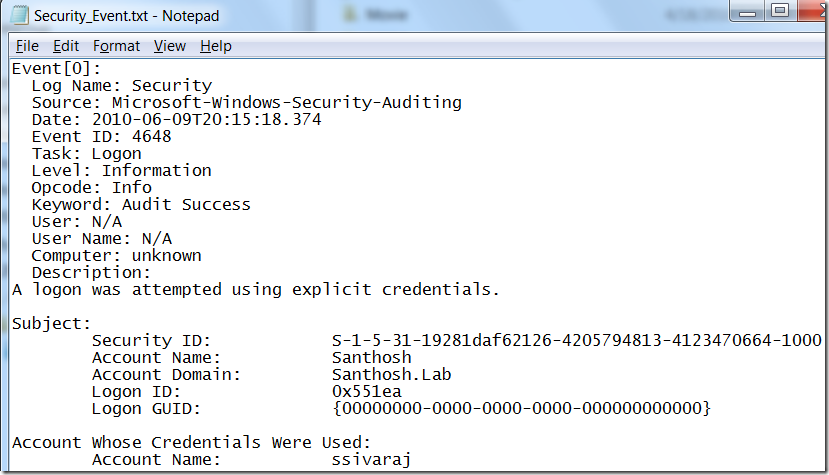
The following command exports event ID 4648 or 4729 from Security event to a Security_Event.txt file. 

wevtutil qe security /rd:true /f:text /c:1 /q:"*[System[Provider[@Name='Microsoft-Windows-SecurityAuditing'] and (EventID=4648 or EventID=4729)]]" >C:\Security_Event.txt


image 

Security_Event.txt

image

Setp2 – Email Alert
The second step is to email this file as an attachment.  You can use the following procedure to generate an email alert: (Attach Task To This Event)

http://portal.sivarajan.com/2010/04/generate-email-alert-to-event-attach.html

wevtutil Command Reference:

http://technet.microsoft.com/en-us/library/cc732848(WS.10).aspx

Monday, April 5, 2010

Generate an email Alert to an Event - Attach Task To This Event

In windows 7 and windows 2008, you can generate an email alert when an event meets specified criteria in the event log.  Here is the procedure.

From Event Viewer –>Windows Logs –> Right click on the event and select  Attach Task To This Event option. 

image


From the Create Basic Task Wizard, select Send an e-mail option as the Action task. 

image

Then configure your email properties. 

image

When you complete this task, it will create a task in the Task Scheduler.  You can see the details in the following screenshot:

image

Related Blogs and Articles:

http://portal.sivarajan.com/2010/06/export-and-email-event-log-information.html

Popular Posts

Share

Twitter Delicious Facebook Digg Stumbleupon Favorites More