SS Technology Forum

SS Technology Forum

Computer Migration - Things to Consider

Here are a few points which you can consider while doing computer migration. These points are applicable to all migrations irrespective of the migration tool (ADMT, NetIQ, Quest etc)

Active Directory User Migration

Here is a graphical representation of the high level steps involved in an Active Directory migration using ADMT

User Migration and Merging Using Quest Migration Manager

Pre-creating user account in the target domain is a common scenario these days due to single-sign-on solution, HR management procedure etc

Microsoft Right Management Service (RMS)

Rights Management Service (RMS) is an add-on to many RMS aware applications. In this article my main focus is to explain how we can utilize RMS technology with Exchange 2003 and how we can take advantage of RMS technology to increase the email security

Microsoft ISA Server

I am sure we have all either encountered or heard of this "problem" one time or another if the ISA Server is part of the Active Directory Domain. Is it a problem?

Showing posts with label Windows Server 2008 R2. Show all posts

Thursday, September 1, 2011

ObjectSID and Active Directory

What is an objectSID in Active Directory?

When a new object is created in Active Directory, Domain Controller assigns a unique value used to identify the object as a security principal.  This value is unique inside the domain.  An ObjectSID includes a domain prefix identifier that uniquely identifies the domain and a Relative Identifier (RID) that uniquely identifies the security principal within the domain. The RID is a monotonically increasing number at the end of the SID

How do I get ObjectSID information from Active Directory?

You can see the ObjectSID information using ADSI Edit or Attribute Editor or you can use DSQUERY commands.   I will explain these details with the a few screenshots:

Domain SID – I am using the following DSQUERY command with a name filter to get the SID of my domain. 

image

image

User SID – As you can see from the following screenshot, the objectSID of the user (TestABC1) is consist of Domain SID of the domain (santhosh) + Relative ID(RID) of the user account. 

image

image

RID Allocation

RID number will assigned from the RID pool (rIDAAllocationPool) of the Domain Controller.  Each domain controller is assigned a pool of RIDs from the global RID pool by the domain controller that holds the RID master FSMO role.  You can get the RID pool allocation table details using the dcdiag /test:ridmanager /v command. 

image

Keep in mind that the RID pool will be different in each domain controller.  RID will be allocated to an object in Active Directory based on the Domain Controller that you are using.  Here is an example from my second domain controller in my domain:

image

As you can see in the above screenshot, if I create a new object using this domain controller, the new object will be assigned with 1601 (rIDNextRID) as the RID.

You can also use DQUERY command to get the properties of the RID Set.  However, you need to convert some of the values.

image

By default, RID pools will be allocated in increments of 500 (rIDAllocationPool).

image


Other Related Blogs and Articles:

Verify sIDHistory and Identify the Source User Account - http://portal.sivarajan.com/2011/03/verify-sidhistory-and-identify-source.html

ObjectSID Vs sIDHistory - http://sivarajan.com/forum/viewthread.php?tid=8

Identify SID Using DSQUEY Command - http://portal.sivarajan.com/2010/06/identify-sid-using-dsquey-command.html

PowerShell Script - Search Active Directory and Generate SIDHistory Report - http://portal.sivarajan.com/2010/12/powershell-script-search-active.html

SID Filtering – Access is denied - http://portal.sivarajan.com/2009/06/sid-filtering-access-is-denied.html

ADMT SID Mapping File Generation Using DSQUERY Command - http://portal.sivarajan.com/2011/04/admt-sid-mapping-file-generation-using.html

siDHistory Report - with Multi Value Support - http://portal.sivarajan.com/2011/04/sidhistory-report-with-multi-value.html


Tuesday, August 9, 2011

Active Directory and userAccountControl Attribute

As you know, searching Active Directory attributes using DSQUERY commands or scripts is not difficult.  You can get the values directly from the attribute.  However, searching the enabled, disabled status,PasswordExpired  etc can be challenging because these properties/values are not stored in its own attribute.  These account properties are controlled by an attribute called userAccountControl. 

what is userAccountControl ?

It is a 4 bytes (32-bit) integer that represents a bitwise enumeration of various flags that controls the behavior of an object. The attributeID (ruleOD) of this object is 1.2.840.113556.1.4.8.  The attributeID is a unique X.500 Object Identifier(OID) for identifying an attribute. 

image

How do I search userAccountControl values in Active Directory?

It is like searching any other attribute in Active Directory. However, you need to represent the userAccountControl values in numeric.  The syntax of the LDAP matching rule is

attributename:ruleOID:=value

where attributename is the LDAP DisplayName -in this case it is userAccountControl, ruleOID is the attributeID for the matching rule control - in this case it is 1.2.840.113556.1.4.80X, and value is the decimal value you want to use for search.  I will explain the details using a couple of examples. 

The following DSQUERY command returns all disabled user accounts in Active Directory.  

dsquery * -limit 0 –filter "(&(objectCategory=person)(objectClass=user)(userAccountControl:1.2.840.113556.1.4.803:=2))" –attr name

userAccountControl = 2 means the user account is disabled (ADS_UF_ACCOUNTDISABLE)

and the following DSQUERY command returns all users with the 'Password Never Expires' settings enabled.

dsquery * -limit 0 –filter "(&(objectCategory=person)(objectClass=user)(userAccountControl:1.2.840.113556.1.4.803:=65536))" –attr name

userAccountControl = 65536 means the user account has 'Password Never Expires' flag enabled (ADS_UF_DONT_EXPIRE_PASSWD)

So where did the attributeID (ruleOID) 1.2.840.113556.1.4.803 come from?

The value of attributeID (ruleOID) can be either bitwise AND (1.2.840.113556.1.4.803) or bitwise OR  (1.2.840.113556.1.4.804)

  • 1.2.840.113556.1.4.803 – This is the bitwise AND operator (LDAP_MATCHING_RULE_BIT_AND).  The rule is true only if all bits from the property match the value. 
  • 1.2.840.113556.1.4.804 – This is the bitwise OR operator (LDAP_MATCHING_RULE_BIT_OR).  The rule is true if any bits from the property match the value.

Here is the complete structure:

image


How do I get the userAccountControl values? 

These userAccountControl flag values are available in following MSDN articles. Make sure to use Decimal values not HEX. 

  1. http://msdn.microsoft.com/en-us/library/ms680832(v=vs.85).aspx
  2. http://msdn.microsoft.com/en-us/library/aa772300(v=vs.85).aspx

Conclusion

Regardless of what method you use (commands or scripts) you can search Active Directory using userAccountControl flags using the above mentioned syntax. 

Looking for more DSQUERY examples?

Visit my TechNet Wiki article - http://social.technet.microsoft.com/wiki/contents/articles/3537.aspx


Tuesday, July 26, 2011

Change Service Account Username & Password–PowerShell Script

This PowerShell script can be used to change the service account credentials remotely. 

Input – The input file (input.csv) contains server/computer name in the following format: 

image

Script

image

Output – You will see the status on the screen as shown in the following screenshot:

image

Download – You can download this script from the following locations:

  1. www.sivarajan.com - http://www.sivarajan.com/scripts/Change_Service_Credentials.txt
  2. Microsoft TechNet Gallery - http://gallery.technet.microsoft.com/scriptcenter/79644be9-b5e1-4d9e-9cb5-eab1ad866eaf

More Scripts - http://portal.sivarajan.com/search?q=script+powershell&max-results=20


Thursday, July 21, 2011

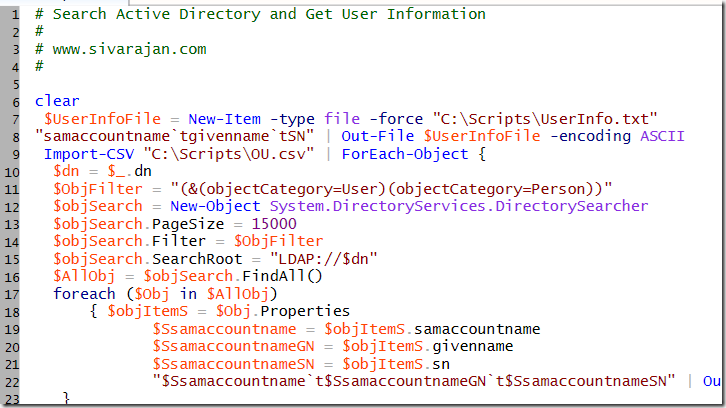
Search Active Directory & Get User Properties–PowerShell Script

You can use this PowerShell script to search Active Directory and get the user properties.  The input file (OU.csv) contains OU name sin the following format:

image

Script:

image

Download:

You can download the script from the following locations:

www.sivarajan.com - http://www.sivarajan.com/scripts/SearchAD_UserInfo.txt

Microsoft TechNet Gallery - http://gallery.technet.microsoft.com/scriptcenter/dd152aa5-bc94-4ac8-9eeb-3bc5b98d425a

More scripts - http://portal.sivarajan.com/search?q=script+powershell&max-results=20

Thursday, July 14, 2011

User Must Change Password at Next Logon–pwdLastSet–PowerShell Script

This PowerShell script can be used update the pwdLastSet (User Must Change Password at Next Logon) value in Active Directory.  You can use either “0” or “-1” to enable to disable this option:

0 to enable the User must change password at next logon option
-1 to disable the User must change password at next logon option

Script: 

image

Output:

image

Download:

www.sivarajan.com - http://www.sivarajan.com/scripts/User_Change_Password.txt

TechNet Gallery - http://gallery.technet.microsoft.com/scriptcenter/030d1ff1-df99-47fe-b9c3-ecd4d98ffd7d

More scripts - http://portal.sivarajan.com/search?q=script+powershell&max-results=20

Tuesday, July 12, 2011

Move Computer Objects Based on Operating System Version

This logic can be used move computer objects in Active Directory based based on their Operating System version. 

Option #1 – DS Commands

dsquery * CN=Computers,DC=santhosh,DC=lab -filter "(&(ObjectClass=computer)(objectCategory=Computer)(operatingSystemVersion=6.1))" | dsmove -newparent OU=Win7,OU=ComputerAccounts,DC=santhosh,DC=lab

The above command will move all Windows 7 computers to OU=Win7,OU=ComputerAccounts,DC=santhosh,DC=lab OU.

dsquery * CN=Computers,DC=santhosh,DC=lab -filter "(&(ObjectClass=computer)(objectCategory=Computer)(operatingSystemVersion=5.1))" | dsmove -newparent OU=WinXP,OU=ComputerAccounts,DC=santhosh,DC=lab

The above command will move all Windows XP computers to OU=WinXP,OU=ComputerAccounts,DC=santhosh,DC=lab OU.


Option #2 – Ver or systeminfo Commands

In option #1, I am verifying the OperatingSystem or OperatingSystemVersion values from Active Directory attribute.  You can also verify these values  from the actual computer objects using the following method:

http://portal.sivarajan.com/2011/03/operating-system-infobatch-file.html


Filter

You can update the filter based on OperatingSystem or OperatingSystemVersion values. Also, I have used the default computer location (CN=Computers,DC=santhosh,DC=lab) query.

image

operatingSystemVersion - http://msdn.microsoft.com/en-us/library/ms724832(v=vs.85).aspx

operatingSystem - http://msdn.microsoft.com/en-us/library/aa370556(v=vs.85).aspx


Server Object Filter

If your goal is to move all “severs”, you can modify the search using the "(&(ObjectClass=computer)(objectCategory=Computer)(operatingSystem=*server*)) filter.  This filter will verify the”server” string the operatingSystem attribute value. 


Domain Controller Filter

If you want to exclude all Domain Controllers, you can use the following userAccountControl filter (Active Directory and userAccountControl Attribute).

(&(ObjectClass=computer)(objectCategory=Computer)(!userAccountControl:1.2.840.113556.1.4.803:=8192))


Automation

You can create a batch file with these commands or create a schedule task to achieve this goal.   If you really want to automate this process, you attach this script to an event ID using Attach Task To This Event option.

http://portal.sivarajan.com/2010/04/generate-email-alert-to-event-attach.html


Sunday, October 10, 2010

Trust - The operation failed The specified user already exists

Issue:

Domain trust creation process failed with the following error message:

The operation failed The specified user already exists

Resolution:

Verify the following components:

1. Proper name resolution between 2 domains

2. Required firewall ports are open between 2 domains - http://support.microsoft.com/kb/179442

3. Ihe Users container or the entire domain to see if it already contains an object with the same name (including $) as the domain with which you are creating a trust.

Technorati Tags: ,

Monday, November 9, 2009

Office 2010, SharePoint 2010 and Windows Server 2008 R2 Courses on Channel9

Three new courses are available on Channel9. Office 2010, SharePoint 2010 and Windows Server 2008 R2 Courses …

http://channel9.msdn.com/posts/Learn/New-Office-2010-SharePoint-2010-and-Windows-Server-2008-R2-Courses/

Tuesday, June 23, 2009

SID Filtering – Access is denied

I recently came across an "Access is denied" issue when I was trying to disable the SID filtering in Windows 2008 side.

Anyway, this is what I did to resolve the issue:

I have enabled the "Network access: Allow anonymous SID/Name translation" GPO settings in "Computer Configuration\Policies\Windows Settings\Security Settings\Local Policies\Security Options".

image

I have performed this action only in my Windows 2008 Domain.

Also, please read the following articles and make sure you understand policy details before enabling it.

http://support.microsoft.com/kb/823659
http://technet.microsoft.com/en-us/library/cc728431.aspx

Tuesday, May 26, 2009

Service Pack 2 for Windows 2008 and Vista

Wednesday, October 25, 2006

ADPREP Folder and files on a Vista CD???

Why do we need an ADPREP folder and files on a Vista CD?

image

Update: October 25, 2006 9:30 PM

By using these schema extensions, you can test the following Windows Vista features in a nonproduction forest:

  1. BitLocker Drive Encryption
  2. Improvements to Group Policy-based configuration for wireless and wired client computers

However, It is not recommended to use Schema Extension in a production environment.

Popular Posts

Share

Twitter Delicious Facebook Digg Stumbleupon Favorites More