SS Technology Forum

SS Technology Forum

Computer Migration - Things to Consider

Here are a few points which you can consider while doing computer migration. These points are applicable to all migrations irrespective of the migration tool (ADMT, NetIQ, Quest etc)

Active Directory User Migration

Here is a graphical representation of the high level steps involved in an Active Directory migration using ADMT

User Migration and Merging Using Quest Migration Manager

Pre-creating user account in the target domain is a common scenario these days due to single-sign-on solution, HR management procedure etc

Microsoft Right Management Service (RMS)

Rights Management Service (RMS) is an add-on to many RMS aware applications. In this article my main focus is to explain how we can utilize RMS technology with Exchange 2003 and how we can take advantage of RMS technology to increase the email security

Microsoft ISA Server

I am sure we have all either encountered or heard of this "problem" one time or another if the ISA Server is part of the Active Directory Domain. Is it a problem?

Showing posts with label QMM. Show all posts

Tuesday, April 9, 2013

QMM Directory Sync–Mail Enabled and Mailbox Enabled Objects

With latest hotfix/update for Quest Migration Manager (QMM) - https://support.quest.com/SolutionDetail.aspx?id=SOL77417, you should be able to create mail enabled objects in the target or source domain.  This was one of most requested and awaited feature for QMM. 

You will see the following three new options in the Directory Synchronization  tab after installing this update:

  • Users without mail options
  • Mail enabled users
  • Mailbox enabled users

image

Of course this a global configuration and these options will affect Source and Target directory synchronizations.  If you are thinking about a Global Address List (GAL) synchronization solution, you may need to configure a separate QMM project with appropriate options. 


___________________________________________________________________________________________

Migrating from Windows Server 2008 or Windows Server 2008 R2 to Windows Sever 2012?

Paperback - http://www.amazon.com/dp/1849687447/?tag=packtpubli-20

eBook - http://www.packtpub.com/migrating-from-2008-and-2008-r2-to-windows-server-2012/book

___________________________________________________________________________________________

Tuesday, January 29, 2013

Mailbox Migration - MAPI_E_FAILONEPROVIDER / Invalid Data

Mailbox migrations can be challenging and interesting Smile  I ran into an issue this morning with one mailbox using Quest Migration Manager.  Quest Mail Target Agent (MTA) was failing with our “favorite” MAPI_E_FAILONEPROVIDER error. 

1/29/2013 5:16:19 PM    CSession::Logon               Error      -2147221219       You do not have permission to log on. - MAPI_E_FAILONEPROVIDER (Microsoft Exchange Server Information Store)  Low level error: 0x0 File: 'aeWrapHelpers.h' Line: '279'

1/29/2013 5:16:19 PM    MailKernel::Connect      Informational    2079       Synchronization status: Object XXXXXXXXXXXXXXXXXXXXXX synchronization was not started due to connection errors.

When I open the properties of this mailbox in Exchange 2010 side, I was getting the following error message:

clip_image002

I found some detailed error message by going through the properties of this mailbox.   In my case it was due the value of Delivery Restriction property in Exchange 2010.

clip_image002[4]

The 30 GB Sending message size!!! (don’t ask me why Winking smile) was configured in the source mailbox.  

clip_image002[7]

QMM tries to populate this value during the Quest directory sync.  It was failing due to the size limitation in the target Exchange 2010 environment. 

Thursday, July 19, 2012

Quest Migration Manager EMWProf – MAPI_E_USER_CANCEL 0X80040113

This error message was little misleading! 

[Error] Cannot open default message store.

MAPI error.

Error code: 0x80040113

Description: MAPI_E_USER_CANCEL

Stack:

Function Address: 004e7801

Function Address: 00456a5e

Function Address: 0046bcb3

Function Address: 0046a6dc

Function Address: 0042b42c

Function Address: 0042b7e6

Function Address: 0047981b

Function Address: 005e5fdf

Function Address: 7c817077

Resolution

According to all Quest documents, this error is due name resolution issues.  In my case, it was “technically” true.  However, the actual issues wasn’t related to a “pure” NetBIOS or FQND name resolution.  I had the same computer object (same name) in the target domain.  So the workstation or EMWProf wasn't getting the correct source Exchange information.  It was resolving to an object in the target domain instead of the source Exchange server.  I deleted the duplicate computer name in target domain and everything started working!

Wednesday, July 6, 2011

User Account Migration and Merging – Part II (Quest Migration Manager)

Part I - User Account Migration and Merging Using ADMT
Part II - User Account Migration and Merging Using QMM
Pre-creating user account in the target domain is a common scenario these days due to single-sign-on solution, HR management procedure etc. This will make the user migrate procedure more challenging. During the migration you need to make sure these accounts are properly “merged” with correct SID information.
In this example, I will explain a procedure to migrate and merge user accounts using Quest Migration Manager (QMM). You can read the  Part I (User Account Migration and Merging – Part I (ADMT)) of this document in the following link:
http://portal.sivarajan.com/2011/05/user-account-migration-and-merging-part.html
Scenario:
I have pre-created user accounts in the target domain. Their logon name (samAccoutnName) is different in the target domain. My goal to migrate an account from the source domain, merge it with the corresponding account in the target domain and maintain the source SID in the migrated object.
Migration Plan:
My plan is to use an input file which contains a mapping between source and target user accounts.  The file encoding type must be ANSI.  You can read about this requirement in my following blog:
http://portal.sivarajan.com/2010/12/user-migration-and-input-file-format.html
Here is an example of this input file:
image
In the above example, my plan is to migrate User1 and merge it with a pre-created user account (12345) in the target domain.  The column headers are Source sAMAccountName, Target sAMAccountName  and Target Name
Migration Procedure:
1. Open Quest Migration Manager console.  Right click on the Migration node and select New Session option

87236 dfasdf jlasdfj lasdjf lasdjflasjdflajsd fljasdlkfjasldkfj laskdjflksadjflkasdj flksdj flksdjf lksadjf lkasjdflkajsdflkjsadlkfjsadlf jsadlkf Sa dfasdf jlasdfj lasdjf lasdjflasjdflajsd fljasdlkfjasldkfj laskdjflksadjflkasdj flksdj flksdjf lksadjf lkasjdflkajsdflkjsadlkfjsadlf jsadlkf Sa dfasdf jlasdfj lasdjf lasdjflasjdflajsd fljasdlkfjasldkfj laskdjflksadjflkasdj flksdj flksdjf lksadjf lkasjdflkajsdflkjsadlkfjsadlf jsadlkf Sa dfasdf jlasdfj lasdjf lasdjflasjdflajsd fljasdlkfjasldkfj laskdjflksadjflkasdj flksdj flksdjf lksadjf lkasjdflkajsdflkjsadlkfjsadlf jsadlkf Sa dfasdf jlasdfj lasdjf lasdjflasjdflajsd fljasdlkfjasldkfj laskdjflksadjflkasdj flksdj flksdjf lksadjf lkasjdflkajsdflkjsadlkfjsadlf jsadlkf
dfasdf jlasdfj lasdjf lasdjflasjdflajsd fljasdlkfjasldkfj laskdjflksadjflkasdj flksdj flksdjf lksadjf lkasjdflkajsdflkjsadlkfjsadlf jsadlkf Sa dfasdf jlasdfj lasdjf lasdjflasjdflajsd fljasdlkfjasldkfj laskdjflksadjflkasdj flksdj flksdjf lksadjf lkasjdflkajsdflkjsadlkfjsadlf jsadlkf Sa dfasdf jlasdfj lasdjf lasdjflasjdflajsd fljasdlkfjasldkfj laskdjflksadjflkasdj flksdj flksdjf lksadjf lkasjdflkajsdflkjsadlkfjsadlf jsadlkf Sa dfasdf jlasdfj lasdjf lasdjflasjdflajsd fljasdlkfjasldkfj laskdjflksadjflkasdj flksdj flksdjf lksadjf lkasjdflkajsdflkjsadlkfjsadlf jsadlkf Sa dfasdf jlasdfj lasdjf lasdjflasjdflajsd fljasdlkfjasldkfj laskdjflksadjflkasdj flksdj flksdjf lksadjf lkasjdflkajsdflkjsadlkfjsadlf jsadlkf

image_thumb29
Verify sIDHistory and Identify the Source User Account - http://portal.sivarajan.com/2011/03/verify-sidhistory-and-identify-source.html
siDHistory Report - with Multi Value Support - http://portal.sivarajan.com/2011/04/sidhistory-report-with-multi-value.html
Generate sidHistory Report using DSQUERY command - http://portal.sivarajan.com/2011/01/generate-sidhistory-report-using.html
[image7.png]
QMM Directory Synchronization
 
87236 dfasdf jlasdfj lasdjf lasdjflasjdflajsd fljasdlkfjasldkfj laskdjflksadjflkasdj flksdj flksdjf lksadjf lkasjdflkajsdflkjsadlkfjsadlf jsadlkf Sa dfasdf jlasdfj lasdjf lasdjflasjdflajsd fljasdlkfjasldkfj laskdjflksadjflkasdj flksdj flksdjf lksadjf lkasjdflkajsdflkjsadlkfjsadlf jsadlkf Sa dfasdf jlasdfj lasdjf lasdjflasjdflajsd fljasdlkfjasldkfj laskdjflksadjflkasdj flksdj flksdjf lksadjf lkasjdflkajsdflkjsadlkfjsadlf jsadlkf Sa dfasdf jlasdfj lasdjf lasdjflasjdflajsd fljasdlkfjasldkfj laskdjflksadjflkasdj flksdj flksdjf lksadjf lkasjdflkajsdflkjsadlkfjsadlf jsadlkf Sa dfasdf jlasdfj lasdjf lasdjflasjdflajsd fljasdlkfjasldkfj laskdjflksadjflkasdj flksdj flksdjf lksadjf lkasjdflkajsdflkjsadlkfjsadlf jsadlkf
dfasdf jlasdfj lasdjf lasdjflasjdflajsd fljasdlkfjasldkfj laskdjflksadjflkasdj flksdj flksdjf lksadjf lkasjdflkajsdflkjsadlkfjsadlf jsadlkf Sa dfasdf jlasdfj lasdjf lasdjflasjdflajsd fljasdlkfjasldkfj laskdjflksadjflkasdj flksdj flksdjf lksadjf lkasjdflkajsdflkjsadlkfjsadlf jsadlkf Sa dfasdf jlasdfj lasdjf lasdjflasjdflajsd fljasdlkfjasldkfj laskdjflksadjflkasdj flksdj flksdjf lksadjf lkasjdflkajsdflkjsadlkfjsadlf jsadlkf Sa dfasdf jlasdfj lasdjf lasdjflasjdflajsd fljasdlkfjasldkfj laskdjflksadjflkasdj flksdj flksdjf lksadjf lkasjdflkajsdflkjsadlkfjsadlf jsadlkf Sa dfasdf jlasdfj lasdjf lasdjflasjdflajsd fljasdlkfjasldkfj laskdjflksadjflkasdj flksdj flksdjf lksadjf lkasjdflkajsdflkjsadlkfjsadlf jsadlkf
image
87236 dfasdf jlasdfj lasdjf lasdjflasjdflajsd fljasdlkfjasldkfj laskdjflksadjflkasdj flksdj flksdjf lksadjf lkasjdflkajsdflkjsadlkfjsadlf jsadlkf Sa dfasdf jlasdfj lasdjf lasdjflasjdflajsd fljasdlkfjasldkfj laskdjflksadjflkasdj flksdj flksdjf lksadjf lkasjdflkajsdflkjsadlkfjsadlf jsadlkf Sa dfasdf jlasdfj lasdjf lasdjflasjdflajsd fljasdlkfjasldkfj laskdjflksadjflkasdj flksdj flksdjf lksadjf lkasjdflkajsdflkjsadlkfjsadlf jsadlkf Sa dfasdf jlasdfj lasdjf lasdjflasjdflajsd fljasdlkfjasldkfj laskdjflksadjflkasdj flksdj flksdjf lksadjf lkasjdflkajsdflkjsadlkfjsadlf jsadlkf Sa dfasdf jlasdfj lasdjf lasdjflasjdflajsd fljasdlkfjasldkfj laskdjflksadjflkasdj flksdj flksdjf lksadjf lkasjdflkajsdflkjsadlkfjsadlf jsadlkf
dfasdf jlasdfj lasdjf lasdjflasjdflajsd fljasdlkfjasldkfj laskdjflksadjflkasdj flksdj flksdjf lksadjf lkasjdflkajsdflkjsadlkfjsadlf jsadlkf Sa dfasdf jlasdfj lasdjf lasdjflasjdflajsd fljasdlkfjasldkfj laskdjflksadjflkasdj flksdj flksdjf lksadjf lkasjdflkajsdflkjsadlkfjsadlf jsadlkf Sa dfasdf jlasdfj lasdjf lasdjflasjdflajsd fljasdlkfjasldkfj laskdjflksadjflkasdj flksdj flksdjf lksadjf lkasjdflkajsdflkjsadlkfjsadlf jsadlkf Sa dfasdf jlasdfj lasdjf lasdjflasjdflajsd fljasdlkfjasldkfj laskdjflksadjflkasdj flksdj flksdjf lksadjf lkasjdflkajsdflkjsadlkfjsadlf jsadlkf Sa dfasdf jlasdfj lasdjf lasdjflasjdflajsd fljasdlkfjasldkfj laskdjflksadjflkasdj flksdj flksdjf lksadjf lkasjdflkajsdflkjsadlkfjsadlf jsadlkf
Other Related Blogs & Articles:
Active Directory Migration Using ADMT - http://www.sivarajan.com/admt.html
Computer Migration - Things to Consider - http://www.sivarajan.com/cm.html
User Account Migration and Merging Using ADMT - http://www.sivarajan.com/
ADMT Include File - http://portal.sivarajan.com/2011/06/admt-include-file.html
User Migration and Input File Format - http://portal.sivarajan.com/2010/12/user-migration-and-input-file-format.html

Sunday, March 27, 2011

Computer Migration – Access is Denied

Computer Migration – Access is denied.  I was getting an Access is denied error message in the Quest Resource Updating Manager (RUM) console when I was performing computer migration (move) – domain membership change operation. 

image

In general, “Access is denied” error message during computer “move” means the remote registry service is not running on these computers.  But in this case, the service was running but when I opened the registry remotely, I was getting the following error message:

image

It turned out to be a permission issue on the registry key.  This computer (master image) was upgraded from Windows 2000.  By default, Windows 2000 does not have a built-in user account named Local Service.  Instead, the Remote Registry Service is logged on as Local System. In Windows XP, the Remote Registry Service is logged on as Local Service. 

I assigned Read permission to LOCAL SERVICE on the following registry key:

HKEY_LOCAL_MACHINE\SYSTEM\CurrentControlSet\Control\SecurePipeServers\winreg

image

everything started working after the registry modification. 

Other Related Blogs/Articles:

Active Directory Migration Using ADMT - http://www.sivarajan.com/admt.html

Computer Migration - Things to Consider - http://www.sivarajan.com/cm.html

User Account Migration and Merging Using ADMT - http://www.sivarajan.com/

Wednesday, January 19, 2011

Computer Migration – Network Path Was Not Found

During my recent Active Directory migration using Quest Migration Manger (QMM), I was getting the following error in the Resource Updating Manager (RUM) console when I was performing computer migration.

"The network path was not found"

I was able to install the Quest Migration Manager (QMM) agent and complete the resource updating without any issues.  But when I started the “Move Computer” process, I was getting  "The network path was not found" error message.

image

Resolution:
The issue was due to the Remote Registry service.  The Remote Registry service was not running on the workstation.   If you are performing computer migrations, verify the items listed on my following article:

http://www.sivarajan.com/cm.html

Related Articles:

QMM – Network Path Was Not Found - http://portal.sivarajan.com/2010/03/qmm-network-path-was-not-found.html

Other Related Blogs/Articles:

Active Directory Migration Using ADMT - http://www.sivarajan.com/admt.html

Computer Migration - Things to Consider - http://www.sivarajan.com/cm.html

User Account Migration and Merging Using ADMT - http://www.sivarajan.com/

Tuesday, January 11, 2011

Merging Multiple User Accounts using Quest Migration Manager (QMM)

Here is a method which you can use to merge multiple user and group accounts into a single account in the target domain.   The main goal is to get the objectSID from all source accounts and add them to a single account (sidHistory) in the target domain. 

Here are the high level steps:

Step1 – Create an input file with source and target account samAccountName in the following format:

image

In this example, I am merging suser1 source account with tuser account in the target domain. 

Step 2 – Perform user migration using QMM. 

Step 3 – Clear the QMM matching attributes. As you can see on the following screenshot, QMM has populated the Object GUID and Domain Pair ID values in the matching attributes.  I am using adminDescription and adminDisplayName as the QMM matching attributes.  These values need to be cleared before you can perform the second user migration. 

image

If you don’t clear the QMM matching attribute value, you will see the following error message in the QMM log file and the migration will fail:

image

Step4 – Update the input file with 2nd source account and repeat Step 2 and 3. 

In this example I merged 3 accounts into a single account.  As you can see the in the following screenshot, the target account has  3 values in the sidHistory attribute.

image

If QMM directory synchronization is enabled, the user properties, group membership etc will get updated based on the recent AdminDisplayname and AdminDescription values.

Friday, December 10, 2010

User Migration and Input File Format

I ran into an user migration issue with Quest Migration Manager (QMM) when merging accounts using an input file.  Instead of merging the user account, the QMM was creating a duplicate account in the target domain. 

The input file was in the following format:

SourceSamAccountName<TAB>TargetSamAccountName<TAB>TargetName

The issues was due to the file Encoding type.  We were using  UTF-8 encoding type.  Based on my testing, the Encoding type must be ANSI.  I believe it is because of the TAB character in UTF-8 encoding. 

So if you are planning to use an input file for the migration using Quest Migration Manager (QMM), make sure the Encoding type is ANSI.

image

Tuesday, May 25, 2010

Outlook has encountered a Problem – Mailbox Migration

In my recent Active Directory and Exchange migration project using Quest Migration Manger (QMM), I encountered an issue during the mailbox migration.  I added a couple of mailboxes to the mailbox synchronization collection, after a few hours users started complaining that they can’t login to their mailboxes using Outlook.  There were getting the following error message:

Microsoft Office Outlook has encountered a problem and needs to close.  We are sorry for the inconvenience.  

clip_image002[4]

These mailboxes were not migrated.  They were only in the mailbox synchronization collection.  I opened these mailboxes using MFCMAPI tool (http://portal.sivarajan.com/2010/05/mailbox-and-outlook-troubleshooting.html) and  noticed that, these mailboxes have duplicate “Calendar” folder as displayed in the following screenshot:
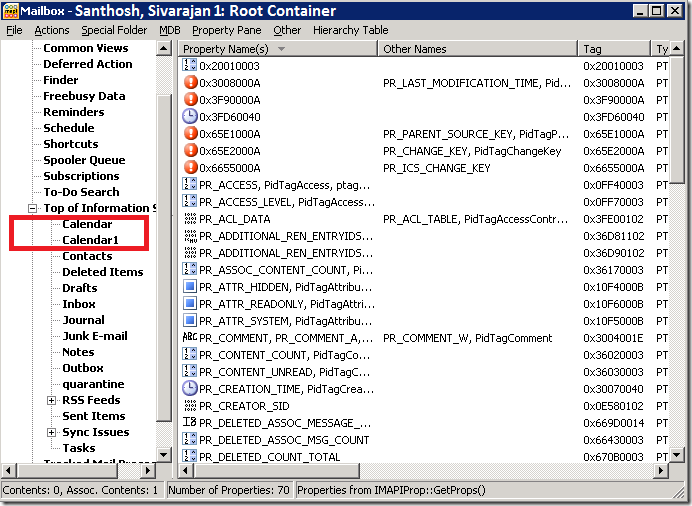
Outlook_QMM

Since outlook was pointing to calendar (outlook today) users were not able to open the outlook.
On some other mailboxes I have seen duplicate “Sync Issues” folder.

Outlook_QMM_2

Cause:
According to Quest support professionals, they have seen duplicate calendar issue before but this is the first time they were seeing duplicate folder issue on different folders.  It may be due to other 3rd party applications such as backup and antivirus software logging into the mailbox while the data is being synchronized. You can see the details on the Quest Solution article SOL42312. 

I implemented the workaround as described in the SOL43372 article but that didn’t help me with the issue.
I was using 8.4 version of the QMM.  According to Quest, this issue will be fixed in 8.6 and they told me they can provide a hotfix for 8.5 version of the product. Unfortunately, they don’t have a fix for 8.4.  Since I had completed 70% of the migrations, I decided not to upgrade it to 8.5 or 8.6 version.

I also noticed that, this issue is happening only from one mailbox server and it is happening whenever I leave the mailboxes in the collection overnight.  It could be because of backup or antivirus scanning on the server in the night.

Workaround:
Since the issue is happening in the night, I decided to schedule the agent synchronization from 7 AM to 7 PM.  This configuration will avoid any third party software (backup, antivirus etc) logging into the mailbox while the data is being synchronized.  After that, I was able to successfully migrate mailboxes from this server. 

Other Related Articles and Blogs:

Active Directory Migration Using ADMT - http://www.sivarajan.com/admt.html

Computer Migration - Things to Consider - http://www.sivarajan.com/cm.html

User Account Migration and Merging Using ADMT - http://www.sivarajan.com/

Thursday, May 20, 2010

Computer Migration – Things to Consider

Here are a few points which you can consider while doing computer migration.  These points are applicable to all migrations irrespective of the migration tool (ADMT, NetIQ, Quest etc). 

Here is a high level flow chart that describes the computer migration process:

San-Article

Admin$ Access (PreMig1 Script) – Ensure that you can access Admin$ or C$ on the workstation using your migration service account.  You can use the following script to test the Admin$ permission:

http://portal.sivarajan.com/2010/01/check-admin-share-using-poweshell.html

Ping (part of PreMig1 Script)– Make sure you can ping the workstation from the migration console/server.  But keep in mind that, if ICMP is disabled on your network, you won’t be able to ping the workstation.  Also, I have seen in many cases that Ping is resolving to an incorrect IP address,  which can be due to a bad WINS server or bad name resolution.

Read more at: http://www.sivarajan.com/cm.html

Other Related Blogs/Articles:

User Account Migration and Merging Using ADMT - http://www.sivarajan.com/

Active Directory Migration Using ADMT - http://www.sivarajan.com/admt.html

Computer Migration - Things to Consider - http://www.sivarajan.com/cm.html

Friday, April 30, 2010

Workstation Profile Migration

If you are using a migration tool (ADMT, Quest, NetIQ etc ) to migrate workstation and user profile, it will automatically translate the SID and assign the same profile to the target user account.  The following procedure is used in the background to achieve this:

· The C:\Documents and Settings\UserName originally has Source SID listed in the ACL. Target SID is added or Source SID is replaced with Target SID depends on your migration tool configuration.

· The Target SID is added under HKEY_LOCAL_MACHINE\Software\Microsoft\Windows NT\CurrentVersion\ProfileList and ProfileImagePath key is assigned the same value that ProfileImagePath has under Source SID. This ensures both source and target users will receive the same profile which is stored under C:\Documents and Settings\UserName.

For some reason, if a migrated user gets a new profile (or lost the old profile) you can use the following procedure to re-assign the old profile back to the target account:

1. Ask the user to log off from the user workstation.

2. Run Regedit from your computer. Connect Network Registry to the user workstation.

3. Go to HKEY_LOCAL_MACHINE\Software\Microsoft\Windows NT\CurrentVersion\ProfileList

4. Go through the Profile list and identify the Source account. Copy the value from the ProfileImagePath key.

image

5. Again go through the Profile list and identify the Target account. Paste the ProfileImagePath key value there.

6. Restart the user workstation.

The ProfileImagePath key will be same value for both Source and Target user accounts. This ensures both source and target users will receive the same profile which is stored under C:\Documents and Settings\UserName.

Sunday, March 28, 2010

QMM – Network Path Was Not Found

During my recent Active Directory and Exchange migration project using Quest Migration Manger (QMM), I was getting the following error in the Resource Updating Manager (RUM) when I was performing computer migrations.

"The network path was not found"

I was able to install the Quest Migration Manager (QMM) agent without any issues.  But when I started the Resource Updating process, I was getting  "The network path was not found" error message. 

image

Resolution/Workaround:
This was due a NetBIOS name resolution issue (not FQDN) from the client workstation to the Quest Migration Manager (QMM)sever.  The client workstation couldn’t ping the QMM server using NetBIOS Name.

Related Articles:

Computer Migration – Network Path Was Not Found - http://portal.sivarajan.com/2011/01/computer-migration-network-path-was-not.html

Computer Migration - Things to Consider - http://www.sivarajan.com/cm.html

Monday, March 15, 2010

Active Directory Migration - System Detected a Possible Attempt To Compromise Security

Quest Migration Manager (QMM)

On my current project, I am using Quest Migration Manger (QMM) for Active Directory and Exchange migrations.  I was getting the following error in the Resource Updating Manager (RUM) when I was performing computer migrations. 

“The system detected a possible attempt to compromise security. Please ensure that you can contact the server that authenticated you”

 image

I found a few TechNet and KB articles which describes the same issue.  But that didn’t help me in my situation.  After looking at the workstation, I found that the Wireless connection was enabled.  Basically this workstation was using wired as well as wireless connections.  When I disabled the wireless connection, everything started working and I successfully migration this computer.

I always recommend to disable the wireless or second network connection before the migration.  I guess in this case help desk forgot to disable the wireless connection.  I know this error message is little misleading but the solution was simple…


Microsoft Active Directory Migration Tool (ADMT)

If you receive the same error message during the ADMT computer migration, try the following options/hotfix:

ERR3:7075 Failed to change domain affiliation, hr=800704f1   The system detected a possible attempt to compromise security. Please ensure that you can contact the server that authenticated you.

http://blogs.technet.com/b/askds/archive/2009/10/19/admt-rodc-s-and-error-800704f1.aspx


Other Related Blogs

Active Directory Migration Using ADMT - http://www.sivarajan.com/admt.html

Computer Migration - Things to Consider - http://www.sivarajan.com/cm.html

ADMT Include File - http://portal.sivarajan.com/2011/06/admt-include-file.html

User Migration and Input File Format - http://portal.sivarajan.com/2010/12/user-migration-and-input-file-format.html

User Account Migration and Merging – ADMT - http://portal.sivarajan.com/2011/05/user-account-migration-and-merging-part.html

User Account Migration and Merging – Quest Migration Manager - http://portal.sivarajan.com/2011/07/user-account-migration-and-merging-part.html


Thursday, February 25, 2010

Active Directory Migration – High Level Steps

Here is a graphical representation of the high level steps involved in an Active Directory migration.  These steps are applicable with any migration tools (ADMT, Quest, NetIQ etc).


image

Read ADMT migration procedure at: http://www.sivarajan.com/admt.html

Thursday, January 21, 2010

Outlook – Cannot move the items to PST

I was at a client site doing migrations using Quest Migration Manager (QMM).  After the EMWProf update, users started complaining that they can’t move any mail items from their mailbox to PST and they were getting the following error message:

image

The issue was related to a GPO that prevents users from moving/adding more items to the PST file.  Here is the registry configuration info:

HKEY_CURRENT_USER\Software\Microsoft\Office\12.0\Outlook\PST\PSTDisableGrow

If you configure the PSTDisableGrow value to 1, it will prevent Outlook from creating new items in a PST file.

Sunday, January 10, 2010

Profile Migration Using Quest Migration Manager (QMM)

I was doing some computer migrations last week with Quest Migration Manager tool.  After the profile migration (re-ACL), I started noticing some strange profiles names on the workstation.  You can see the details on the following screen shot: 

image

There profiles were started with $ and two digit numbers.  I did some search on Quest knowledge base but I couldn’t find anything.   Anyway, after enough troubleshooting, we identified the root cause of the issue. 

Cause:
After the initial directory synchronization, we migrated all user accounts with an input file to change their SamAccountName in the target Domain.  By default, during the next directory synchronization, the DSA will overwrite these SamAccountName based on source the SamAccountName.  Since we need to keep our new SamAccountName in target domain, we decided to disable the SamAccountName synchronization in the directory sync configuration.   If you create a new user accounts in your source Domain, DSA will create these accounts in target domain.  Since we are filtering the SamAccountName, the DSA cannot use SamAccountName.   So the DSA create these accounts with some random numbers ($65FB00.., $75FB00..).  You need to perform a full migration with your new SamAccountName to resolve these issues.   After the user account migration all these profiles will be updated with the correct user names and you will see the correct SamAccountName and pre-W2K names inside your AD. 

image

Wednesday, November 18, 2009

Error 0xe300000c - Cannot apply Mailbox Security Descriptor

On my current project, I am using Quest Migration Manager (QMM) to perform directory synchronization and migration. I was getting the following error when I first enabled the directory sync:

"Error 0xe300000c. Cannot apply Mailbox Security Descriptor to Exchange Store …"

To correct this issue, I used FQDN Domain Controller name instead of Domain name in the domain pair configuration.


Popular Posts

Share

Twitter Delicious Facebook Digg Stumbleupon Favorites More
